API Reference
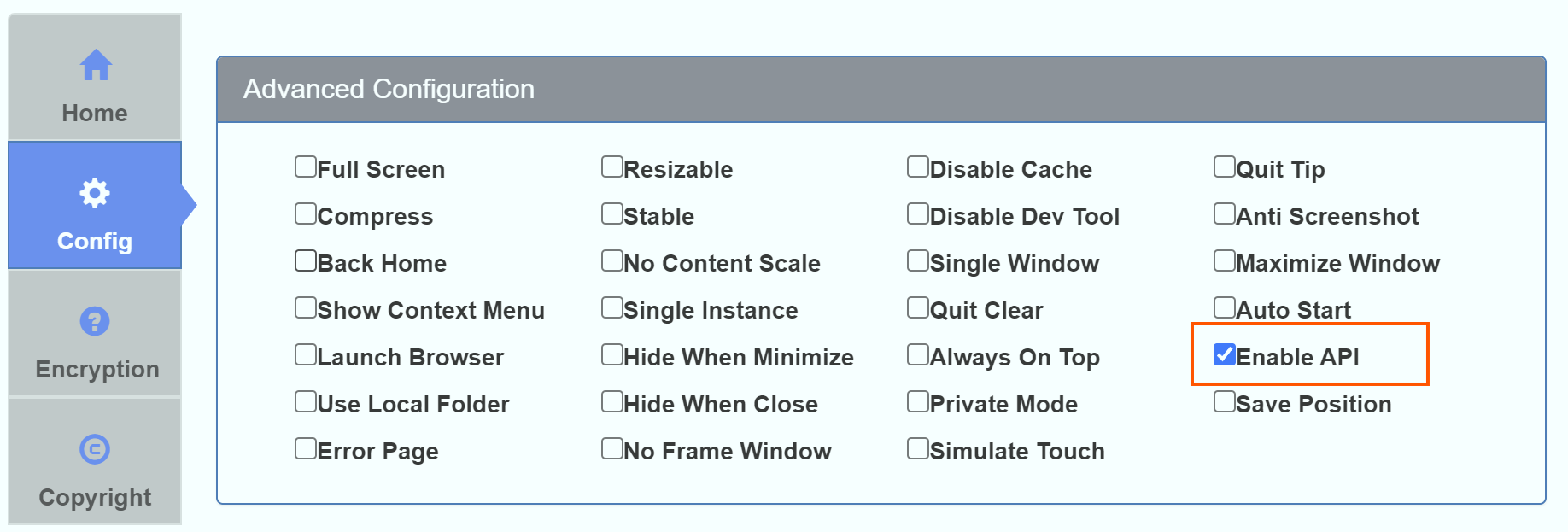
Tip: Before using the APIs provided by the HTML to EXE packaging tool, you need to check the Enable API Support option on the advanced configuration page during packaging, as shown in the image below:
Machine Code API
The machine code API can be used to implement your own authentication logic.
window.HTMLPackHelper.machineCode;
Window Control API
Maximize Window
window.HTMLPackHelper.maximize();
Minimize Window
window.HTMLPackHelper.minimize();
Restore Window Size
window.HTMLPackHelper.restore();
Close Application
window.HTMLPackHelper.close();
Toggle Fullscreen API
window.HTMLPackHelper.toggleFullscreen();
Back to Home Page API
window.HTMLPackHelper.backToHomePage();
Open Local File API
window.HTMLPackHelper.open(path);
Where path is the local file path, supporting both relative and absolute paths.
Examples:
window.HTMLPackHelper.open('C:/Windows/notepad.exe'); // Open Notepad
window.HTMLPackHelper.open('my.docx'); // Open my.docx file in the EXE directory
Open Debug Window
window.HTMLPackHelper.openDebug();
Local Storage API
Get Current Storage Data Size (in bytes)
window.HTMLPackHelper.getStorageSize();
Get Data
window.HTMLPackHelper.get(key); // key is a string
Write Data
window.HTMLPackHelper.set(key, value); // key is a string, value is the string value to save
Clear All Data
window.HTMLPackHelper.clear();
Get Clipboard String API
window.HTMLPackHelper.getClipboardString(); // Returns the string from clipboard
Flash Window API
Start Flashing
window.HTMLPackHelper.flashWindow();
Stop Flashing
window.HTMLPackHelper.stopFlashWindow();
Clear Cache API
window.HTMLPackHelper.clearAllCache();
Shutdown Computer API
window.HTMLPackHelper.shutdownSystem(); // Shuts down the computer after calling
Get Unique Machine Code
window.HTMLPackHelper.getUniqueMachineCode(); // Get unique machine code, more stable compared to the machine code API
Open URL in Browser API
window.HTMLPackHelper.openUrlInBrowser('https://cn.bing.com');
Quit Callback API
window.HTMLPackHelper.onQuit = () => {
    // Your business logic
    // return false: do not close the application after handling
    // return true: close the application after handling
    return false;
};
Get MAC Address API
When packaging, check the enable API option, then in the HTML page, you can get the computer's MAC address information:
// Return result similar to 0b:00:28:00:00:0c
window.HTMLPackHelper.getMac();
Serial Port Communication API
Get the SerialPort class example code as follows:
const SerialPort = HTMLPackHelper.getSerialPort().SerialPort;
For detailed usage instructions, please refer to the following documentation:
SerialPort Usage | Node SerialPort
Get Command Line Arguments
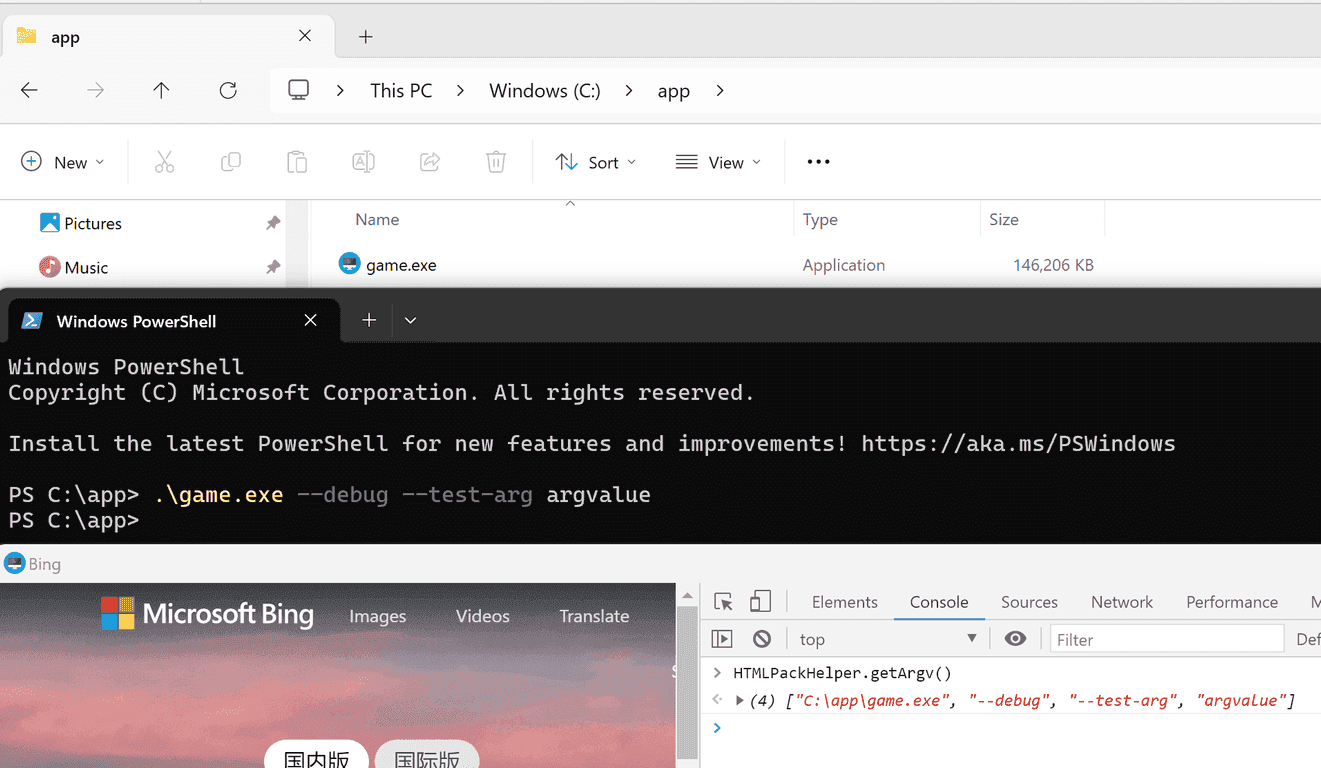
HTMLPackerHelper.getArgv();
The return result is an array, where the first value is the path of the current EXE, and subsequent values are the command line arguments used to open the EXE, as shown in the image below:
File Read/Write API
// Get dd.ini file in user directory, throws exception if it doesn't exist

const content = HTMLPackHelper.getFileContent('dd.ini');

// Get dd.ini file in user directory, returns 'default' if it doesn't exist

const content = HTMLPackHelper.getFileContent('dd.ini', 'default');

// Write "ddd" to dd.ini file in user directory
HTMLPackHelper.writeFileContent('dd.ini', 'ddd');
Get Version API
Use this API to get the app version configured during packaging.
Typical use cases:
- Display version info in an About page.
- Include version in logs for easier troubleshooting.
- Compare local and server versions for update prompts.
// Returns configured version string, e.g. "1.2.0.0"
// Returns "1.0.0.0" by default if no version is configured
const version = window.HTMLPackHelper.getVersion();
Request Header API
Use this API to dynamically add custom HTTP headers for matched URL requests.
Typical use cases:
- Attach
Authorizationtoken for API authentication. - Add custom source/channel headers.
- Append app version in request headers.
Set Request Headers
// urlPattern: URL matching string or wildcard pattern
// headers: key-value object of HTTP headers
window.HTMLPackHelper.setRequestHeaders('https://api.example.com/*', {
    Authorization: 'Bearer your-token',
    'X-Custom-Header': 'value',
    'X-App-Version': window.HTMLPackHelper.getVersion(),
});
Remove Request Headers
// Remove custom request headers configured for the URL pattern
window.HTMLPackHelper.removeRequestHeaders('https://api.example.com/*');